<?xml version="1.0" encoding="UTF-8" ?>
<feed xml:lang="ja" xmlns="http://www.w3.org/2005/Atom" xmlns:dc="http://purl.org/dc/elements/1.1/" xmlns:thr="http://purl.org/syndication/thread/1.0">
  <title type="text">XOR</title>
  <subtitle type="html">天邪鬼のそこはかとない日記</subtitle>
  <link rel="self" type="application/atom+xml" href="http://xor.zoku-sei.com/atom"/>
  <link rel="alternate" type="text/html" href="http://xor.zoku-sei.com/"/>
  <updated>2011-11-24T07:21:43+09:00</updated>
  <author><name>nwpfh</name></author>
  <generator uri="//www.ninja.co.jp/blog/" version="0.9">忍者ブログ</generator>
  <atom10:link xmlns:atom10="http://www.w3.org/2005/Atom" rel="hub" href="http://pubsubhubbub.appspot.com/" />
  <entry>
    <id>xor.zoku-sei.com://entry/4</id>
    <link rel="alternate" type="text/html" href="http://xor.zoku-sei.com/Entry/4/" />
    <published>2030-12-31T23:59:59+09:00</published> 
    <updated>2030-12-31T23:59:59+09:00</updated> 
    <category term="linux" label="linux" />
    <title>XORとは</title>
    <content mode="escaped" type="text/html" xml:lang="utf-8"> 
      <![CDATA[えっ、そこ？みたいな観点でつづっていきたいと思わなくもないこともない<br />
nwpfhがお送りするブログです。<br /><br /><a href="http://xor.zoku-sei.com/Entry/4/" target="_blank">ちなみにXORで検索に引っかかってしまうので説明を軽く</a>]]> 
    </content>
    <author>
            <name>nwpfh</name>
        </author>
  </entry>
  <entry>
    <id>xor.zoku-sei.com://entry/87</id>
    <link rel="alternate" type="text/html" href="http://xor.zoku-sei.com/Entry/87/" />
    <published>2024-08-17T18:44:23+09:00</published> 
    <updated>2024-08-17T18:44:23+09:00</updated> 
    <category term="linux" label="linux" />
    <title>fluxboxからlabwcへの切り替え時にfluxboxでgnome-terminalから入力できなくなる</title>
    <content mode="escaped" type="text/html" xml:lang="utf-8"> 
      <![CDATA[fluxboxからlabwcに切り替えてみた下記インストールする必要があり
<pre> 
  sudo add-apt-repository ppa:samoilov-lex/labwc
  sudo apt-get install labwc
  sudo apt-get install waybar
  sudo apt-get install swaylock
  sudo apt-get install fonts-font-awesome
  sudo apt-get install fonts-fork-awesome
  sudo apt-get install fcitx5
  sudo apt-get install wl-clipboard
  sudo apt install fcitx5-mozc
  sudo apt-get isntall dmenu
</pre>
<br />
labwcに切り替えたが、fluxboxからgnome-terminalから入力できなくなる。。。<br />
原因はwaylandが含まれるbus情報があるとx11で行っていた入力ができなくなるらしい・・・
<pre>(例)
~/.config/ibus/bus/49ba92f181ac4a7caf727f7c56429585-unix-wayland-0 
</pre>]]> 
    </content>
    <author>
            <name>nwpfh</name>
        </author>
  </entry>
  <entry>
    <id>xor.zoku-sei.com://entry/86</id>
    <link rel="alternate" type="text/html" href="http://xor.zoku-sei.com/Entry/86/" />
    <published>2024-01-13T21:58:18+09:00</published> 
    <updated>2024-01-13T21:58:18+09:00</updated> 
    <category term="android" label="android" />
    <title>[Solved] OEM unlock greyed out</title>
    <content mode="escaped" type="text/html" xml:lang="utf-8"> 
      <![CDATA[I installed lineageOS for pixel 6a. But I couldn't unlock my phone. "fastboot flashing unlock" didn't work. Because get_unlock_ability is 0. I looked up for <a href="https://source.android.com/docs/core/architecture/bootloader/locking_unlocking" title="" target="_blank">this page</a>. I couldn't become root, So I clouldn't change ro.oem_unlock_supported option. So I turn on development mode, And displayed developer options. I understood oem lock is disabled. so I search oem unlock, But oem unlock greyed out. I finally found out. I did checkin on <a href="https://source.android.com/docs/setup/build/flash#preparing-your-device" title="" target="_blank">this page</a>. All worked.]]> 
    </content>
    <author>
            <name>nwpfh</name>
        </author>
  </entry>
  <entry>
    <id>xor.zoku-sei.com://entry/85</id>
    <link rel="alternate" type="text/html" href="http://xor.zoku-sei.com/Entry/85/" />
    <published>2023-02-19T10:57:02+09:00</published> 
    <updated>2023-02-19T10:57:02+09:00</updated> 
    <category term="Python" label="Python" />
    <title>PythonでExcelをTSVに変換してみた</title>
    <content mode="escaped" type="text/html" xml:lang="utf-8"> 
      <![CDATA[pythonでExcelからTSVに変換してみた。<br />
DataFrameでもできるのだけども、ストリーム系でないとメモリをめっちゃ食ってしまう。<br />
<a href="https://gist.github.com/doshiraki/3f23cf44d41d50b2b60d9b966244360e">ソース</a><br />
<br />
37万件のデータで実施した場合、<br />
■今回のソースの場合<br />

<pre>$ time python excel2tsv_e.py KEN_ALL.xlsx &gt; ken_all2.txt 

real    0m38.720s
user    0m38.614s
sys     0m0.105s
</pre>
<br />
■DataFrameを使った場合<br />

<pre>$ time python excel2tsv_p.py KEN_ALL.xlsx

real    0m47.467s
user    0m47.094s
sys     0m1.139s
</pre>
<br />
lxml速い。<br />
startイベントでendイベントの関数を生成するの結構良いかも。<br />
あと、4階層以下は都度都度メモリ解放しなくしてるのもうまく働いている。<br />
DataFrameだと最大800Mまでメモリを使用するが、今回のだと50Mくらい。
<pre>            for event, elem in parser.read_events():
                if event == "end":
                    yield event, elem, stack
                    stack.pop()
                    if 1 &lt;= len(stack) &lt;= 2:
                        stack[-1].remove(elem)
                    level -= 1
                else:
                    level += 1
                    stack.append(elem)
                    yield event, elem, stack
</pre>]]> 
    </content>
    <author>
            <name>nwpfh</name>
        </author>
  </entry>
  <entry>
    <id>xor.zoku-sei.com://entry/84</id>
    <link rel="alternate" type="text/html" href="http://xor.zoku-sei.com/Entry/84/" />
    <published>2022-08-15T18:59:08+09:00</published> 
    <updated>2022-08-15T18:59:08+09:00</updated> 
    <category term="C/C++" label="C/C++" />
    <title>mkfifoを使わずに、プログラムの循環パイプ(yourPG | interpreter | yourPG)サンドウィッチ</title>
    <content mode="escaped" type="text/html" xml:lang="utf-8"> 
      <![CDATA[mkfifoを使うと、重複して使えないので、名前なしパイプに名前を付けてみた。<br />
<br />
<a href="https://gist.github.com/doshiraki/779dd679c9d05f3119250655bda70a7f" title="" target="_blank">ソース</a><br />
<br />
■使い方 <a href="https://xor.zoku-sei.com/Entry/82/" title="" target="_blank">fifoの使い道</a>と同じことがパイプファイルなしにできる。<br />

<pre>$ ./a.out
$ $PIPEIN | bash | tee /dev/stderr | python ./test.py | tee /dev/stderr | $PIPEOUT
</pre>
<br />
プロセス内で作成したパイプ処理を環境変数に閉じ込めて、bash呼び出しは重複して呼び出せるので良いかも。]]> 
    </content>
    <author>
            <name>nwpfh</name>
        </author>
  </entry>
  <entry>
    <id>xor.zoku-sei.com://entry/83</id>
    <link rel="alternate" type="text/html" href="http://xor.zoku-sei.com/Entry/83/" />
    <published>2022-08-15T18:48:58+09:00</published> 
    <updated>2022-08-15T18:48:58+09:00</updated> 
    <category term="sed" label="sed" />
    <title>MovableType To Yaml のsedスクリプト作ってみた。</title>
    <content mode="escaped" type="text/html" xml:lang="utf-8"> 
      <![CDATA[引越し検討がてら、MovableType To Yaml のsedスクリプト作ってみた。<br />
<a href="https://www.movabletype.jp/documentation/mt7/appendices/export-import-format/" title="" target="_blank">MovableTypeフォーマット</a><br />
このフォーマットsedで置換できますか？<br />
<br />
<a href="https://gist.github.com/doshiraki/c28d1d349341b4d205f4324140c24f17" title="" target="_blank">ソース</a><br />
<br />
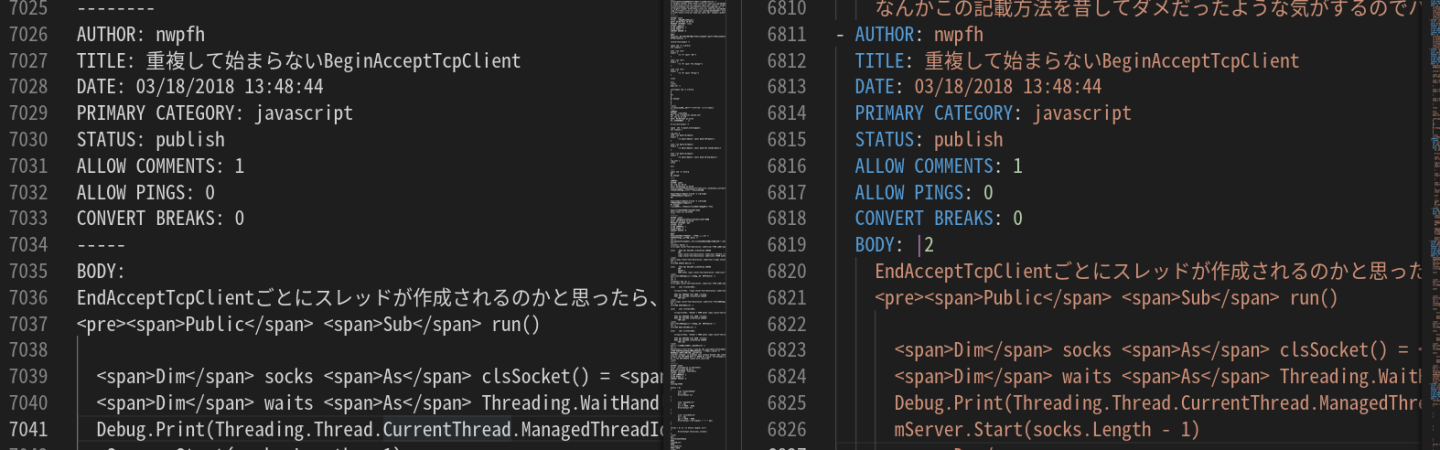
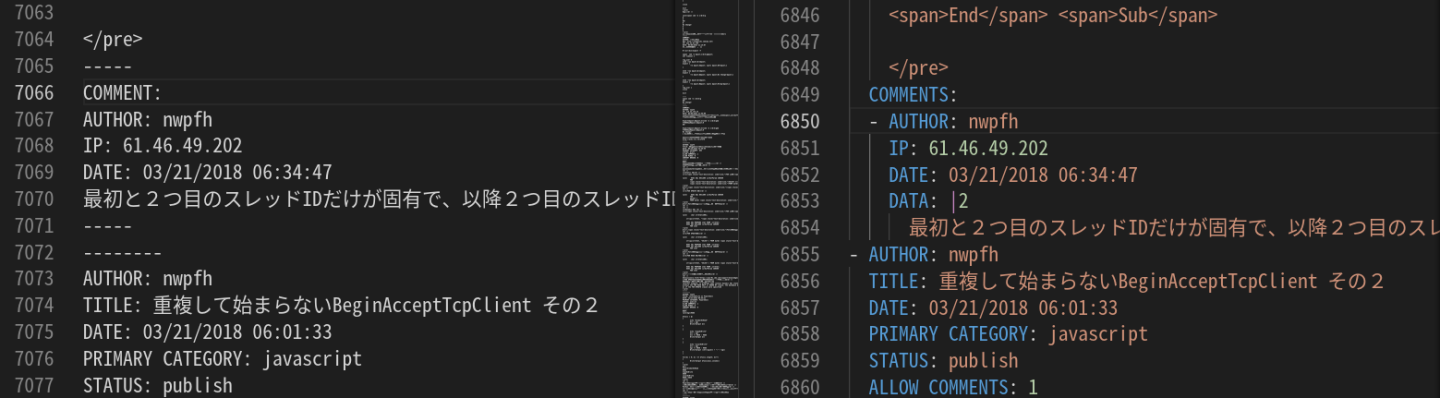
いい感じにyamlになって使い勝手が良いかも？<br />
<a href="//xor.zoku-sei.com/File/unknown.png" title="" target="_blank"><img src="//xor.zoku-sei.com/File/unknown.png" width="100%" alt="" /> <br />
</a> <br />
<a href="//xor.zoku-sei.com/File/b312ae2e.png" title="" target="_blank"><img src="//xor.zoku-sei.com/File/b312ae2e.png" width="100%" alt="" /> </a><br />
<br />
Qiitaはエクスポート標準で対応してないし、インポートもできないのか。。。<br />
引越し辞めるかw]]> 
    </content>
    <author>
            <name>nwpfh</name>
        </author>
  </entry>
  <entry>
    <id>xor.zoku-sei.com://entry/82</id>
    <link rel="alternate" type="text/html" href="http://xor.zoku-sei.com/Entry/82/" />
    <published>2022-08-14T07:38:52+09:00</published> 
    <updated>2022-08-14T07:38:52+09:00</updated> 
    <category term="linux" label="linux" />
    <title>mkfifoの使い道</title>
    <content mode="escaped" type="text/html" xml:lang="utf-8"> 
      <![CDATA[mkfifoを使うと標準出力と標準入力を用いてインタプリタのプログラムを組むことが容易になる。<br />
<br />
pythonプログラム(subprocessを用いていない)<br />

<pre>import re
def send(s):
    RET = "@@RETURN VALUE@@"
    print(s+";echo {} $?".format(RET))
    outputs = []
    while True:
        output = input()
        if re.search("^{} ".format(RET), output):
            m = re.match("^{} (.*)".format(RET), output)
            return (int(m.groups()[0]), outputs)
        outputs.append(output)

import sys
print(send("ping www.google.co.jp -c 4"), file=sys.stderr)
print(send("ls ----"), file=sys.stderr)
</pre>
subprocessなしでシェルをキック<br />

<pre>$ mkfifo net
$ bash &lt; net 2&gt;&amp;1 | tee /dev/stderr | python ls.py | tee net
ping www.google.co.jp -c 4;echo @@RETURN VALUE@@ $?
PING www.google.co.jp (142.250.206.195) 56(84) bytes of data.
64 bytes from kix07s07-in-f3.1e100.net (142.250.206.195): icmp_seq=1 ttl=56 time=14.8 ms
64 bytes from kix07s07-in-f3.1e100.net (142.250.206.195): icmp_seq=2 ttl=56 time=16.6 ms
64 bytes from kix07s07-in-f3.1e100.net (142.250.206.195): icmp_seq=3 ttl=56 time=15.8 ms
64 bytes from kix07s07-in-f3.1e100.net (142.250.206.195): icmp_seq=4 ttl=56 time=15.4 ms

--- www.google.co.jp ping statistics ---
4 packets transmitted, 4 received, 0% packet loss, time 3005ms
rtt min/avg/max/mdev = 14.760/15.666/16.645/0.681 ms
@@RETURN VALUE@@ 0
(0, ['PING www.google.co.jp (142.250.206.195) 56(84) bytes of data.', '64 bytes from kix07s07-in-f3.1e100.net (142.250.206.195): icmp_seq=1 ttl=56 time=14.8 ms', '64 bytes from kix07s07-in-f3.1e100.net (142.250.206.195): icmp_seq=2 ttl=56 time=16.6 ms', '64 bytes from kix07s07-in-f3.1e100.net (142.250.206.195): icmp_seq=3 ttl=56 time=15.8 ms', '64 bytes from kix07s07-in-f3.1e100.net (142.250.206.195): icmp_seq=4 ttl=56 time=15.4 ms', '', '--- www.google.co.jp ping statistics ---', '4 packets transmitted, 4 received, 0% packet loss, time 3005ms', 'rtt min/avg/max/mdev = 14.760/15.666/16.645/0.681 ms'])
ls ----;echo @@RETURN VALUE@@ $?
ls: unrecognized option '----'
Try 'ls --help' for more information.
@@RETURN VALUE@@ 2
(2, ["ls: unrecognized option '----'", "Try 'ls --help' for more information."])
</pre>
<br />
ほかにも、通信系のインタプリタをライブラリなしで実行することができる。<br />
便利なり。<br />
その代わり、標準出力は使えないが(笑)簡易RPA的なコンソールプログラムはすぐに作れる。]]> 
    </content>
    <author>
            <name>nwpfh</name>
        </author>
  </entry>
  <entry>
    <id>xor.zoku-sei.com://entry/81</id>
    <link rel="alternate" type="text/html" href="http://xor.zoku-sei.com/Entry/81/" />
    <published>2021-11-28T09:08:07+09:00</published> 
    <updated>2021-11-28T09:08:07+09:00</updated> 
    <category term="未選択" label="未選択" />
    <title>Ubuntuの復旧 Ubuntu18.04→Ubuntu20.04へのアップデート</title>
    <content mode="escaped" type="text/html" xml:lang="utf-8"> 
      <![CDATA[・Ubuntuが起動できなくなったので、インストールCDでリカバリした。<br />
<a href="https://www.linuxfromscratch.org/lfs/view/stable/chapter07/kernfs.html" title="" target="_blank">マウント</a><br />
<a href="https://www.linuxfromscratch.org/lfs/view/stable/chapter07/chroot.html" title="" target="_blank">chroot</a><br />
<br />
デバイスドライバまわりのメモ<br />
・r8168ネットワークドライバが認識しない。<br />
　<a href="https://tarufu.info/r8168-ubuntu/" title="" target="_blank">RTL8111/8168/8411 のインストールに苦悩した話</a><br />
・i915ビデオドライバがflickerする。<br />
　<a href="https://l-w-i.net/t/ubuntu/pci_bus_error_100.txt" title="" target="_blank">「PCIe Bus Error: severity=Corrected, type=Data Link Layer」を回避する方法</a>]]> 
    </content>
    <author>
            <name>nwpfh</name>
        </author>
  </entry>
  <entry>
    <id>xor.zoku-sei.com://entry/79</id>
    <link rel="alternate" type="text/html" href="http://xor.zoku-sei.com/Entry/79/" />
    <published>2019-10-06T20:17:58+09:00</published> 
    <updated>2019-10-06T20:17:58+09:00</updated> 
    <category term="atcoder" label="atcoder" />
    <title>AGC039 Graph partitionを解いてみた</title>
    <content mode="escaped" type="text/html" xml:lang="utf-8"> 
      <![CDATA[AGC039に参加して<a href="https://atcoder.jp/contests/agc039/tasks/agc039_b" title="" target="_blank">問題B</a>が解けなかったのだけども、解き方が分かったので解説<br />
<br />
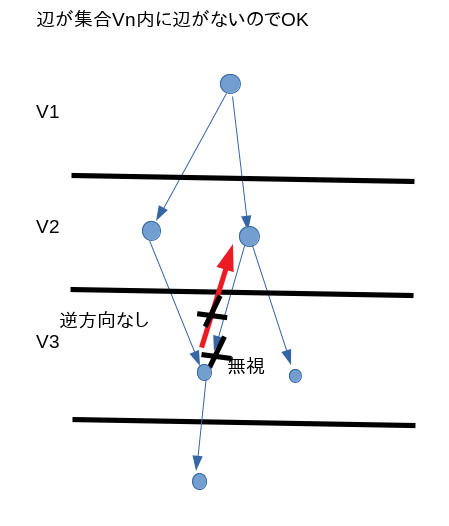
問題としては、同じVnに辺があってはいけないというもの。<br />
<a target="_blank" href="//xor.zoku-sei.com/File/AGC039B1.png" title=""><img src="//xor.zoku-sei.com/Img/1570360277/" alt="" width="80%" /></a> <br />
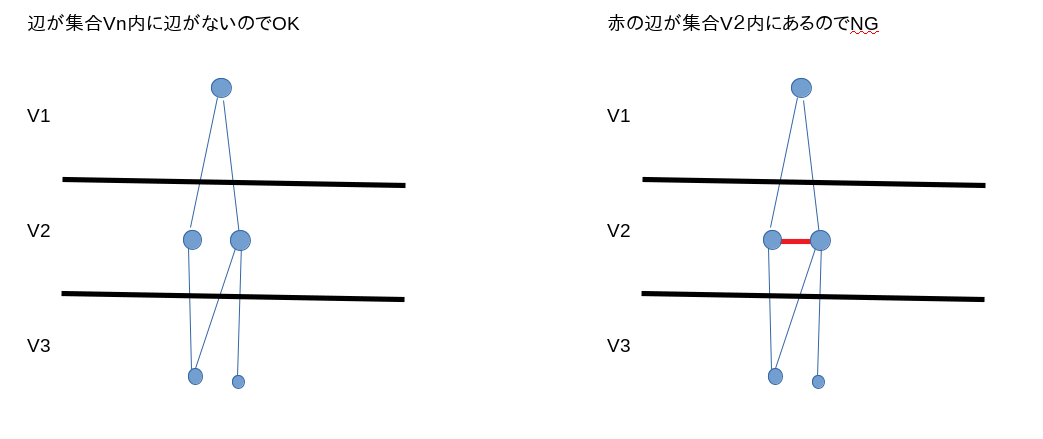
幅優先探索法で、既に探索済みのノードに出会った場合、次のレベルか前のレベルかしかないということに気づけば後はもっとも長いパスを見つければOK<br />
<a target="_blank" href="//xor.zoku-sei.com/File/AGC039B2.png" title=""><img src="//xor.zoku-sei.com/Img/1570360276/" alt="" width="80%" /></a> <br />
<br />
うーん、時間中には思いつかん。。。]]> 
    </content>
    <author>
            <name>nwpfh</name>
        </author>
  </entry>
  <entry>
    <id>xor.zoku-sei.com://entry/78</id>
    <link rel="alternate" type="text/html" href="http://xor.zoku-sei.com/Entry/78/" />
    <published>2019-09-23T10:24:22+09:00</published> 
    <updated>2019-09-23T10:24:22+09:00</updated> 
    <category term="go" label="go" />
    <title>赤黒木をgoで実装してみた</title>
    <content mode="escaped" type="text/html" xml:lang="utf-8"> 
      <![CDATA[作ったのはこちら<br />
<a href="https://github.com/doshiraki/rbtree_bygo/blob/master/rbtree.go" title="" target="_blank">https://github.com/doshiraki/rbtree_bygo/blob/master/rbtree.go</a><br />
<br />
<br />
<a href="https://en.wikipedia.org/wiki/Red%E2%80%93black_tree" title="" target="_blank">赤黒木</a><br />
<br />
やっぱり削除は難しい。。。<br />
ポイントは、delete case 3,4がまったく同じ結果というようにまとめられること。<br />

<pre>	Node := delNode
	for {
		parent := Node.parent
		if parent == nil {
			<strong><span style="text-decoration: underline;">//case 1</span></strong>
			break
		}

		dir := Node.dir()
		dirOther := dir ^ 1
		sibling := parent.children[dirOther]

		if sibling.isRed {
			<strong><span style="text-decoration: underline;">//case 2</span></strong>
			parent.flip(dirOther)
			sibling.isRed = false
			parent.isRed = true
			sibling = parent.children[dirOther]
		}
		<span style="text-decoration: underline;">//sibling is Black</span>

		nephew := sibling.children[dirOther]
		if nephew == nil || !nephew.isRed {
			<span style="text-decoration: underline;">//far nephew is Black</span>
			nephew = sibling.children[dir]
			if nephew == nil || !nephew.isRed {
				<span style="text-decoration: underline;">//near nephew is Black</span>
				sibling.isRed = true
				if parent.isRed {
					<strong><span style="text-decoration: underline;">//case 4</span></strong>
					parent.isRed = false
					break
				} else {
					<strong><span style="text-decoration: underline;">//case 3</span></strong>
					Node = parent
					continue
				}
			}
			<strong><span style="text-decoration: underline;">//case 5</span></strong>
			<span style="text-decoration: underline;">//near nephew is Red and far nephew is Black</span>
			sibling.flip(dir)
			sibling, nephew = nephew, sibling
			sibling.isRed = false
			nephew.isRed = true
		}
		<strong><span style="text-decoration: underline;">//case 6</span></strong>
		<span style="text-decoration: underline;">//sibling is Black &amp;&amp; far nephew is Red</span>

		saveColor := parent.isRed
		parent.flip(dirOther)
		sibling.isRed = saveColor
		parent.isRed = false
		nephew.isRed = false
		break

	}

</pre>]]> 
    </content>
    <author>
            <name>nwpfh</name>
        </author>
  </entry>
</feed>